
The Forgotten Web Tool That Can Finally Fix Government Forms

There's a tiny piece of browser technology that most people have never heard of. It doesn't require an extension. It doesn't require an account. It doesn't require installation in any traditional sense. It's been sitting inside every major browser for over two decades, largely ignored - and it might be the most practical solution to one of the most frustrating experiences on the modern internet: filling out government forms online.
It's called a bookmarklet.
What Is a Bookmarklet?
A bookmarklet is a regular browser bookmark - the kind you save to your bookmarks bar - except instead of pointing to a URL, it contains a small snippet of JavaScript that runs on whatever page you're currently visiting.
You click it like any bookmark. But instead of navigating somewhere, it does something to the page you're already on.
A simple example: a bookmarklet that highlights every phone number on a page, or one that strips all the formatting from an article so you can read cleanly. The concept is lightweight, portable, and requires zero installation overhead.
Bookmarklets emerged in the late 1990s and were popular in the early web era before browser extensions took over. But extensions require browser-specific packaging, store approval, and elevated permissions. A bookmarklet is just a line of JavaScript. You drag it to your bookmarks bar and it's ready.
How to Create Bookmarklets
Creating a bookmarklet is almost identical to creating a regular bookmark. The only difference is that you'll write JavaScript in the URL field instead of an HTTP/HTTPS URL.
Navigate to the Bookmark Menu
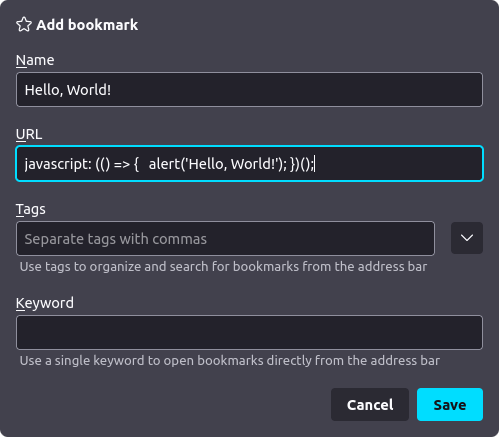
Mozilla Firefox
Either in your bookmarks bar, or in the Bookmarks sidebar (CTRL + B), you can right-click, then click "Add Bookmark...":
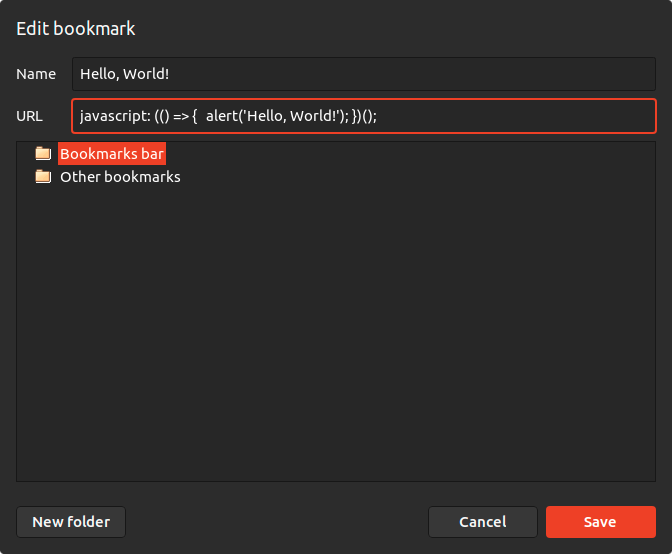
Chromium
You can right-click your bookmarks bar, then click "Add page...". Alternatively, you can go to your Bookmarks manager, then right-click and click "Add new bookmark":
How to Write a Bookmarklet
In the URL field of the bookmark modal, write a JavaScript function in the following format.
javascript: (() => {
  // Your code here!
})();
javascript: is the URL's protocol. This indicates that the browser should execute the bookmark as JavaScript.
(() => { }) defines an anonymous function (lambda). You should write the code you want to execute between the curly braces.
(); will execute the anonymous function you just created.
javascript: (() => {
  alert('Hello, World!');
})();
You can also make it generate HTML and open it as an HTML document:
javascript: (() => {
  return '<h1 style="color: white; background-color: black;">Hello, World!</h1>';
})();
The Government Form Problem
Anyone who has filled out a US government form online knows the experience. Long, multi-page applications. Conditional questions that appear only after answering a previous one. Session timeouts that erase your progress. No autosave. No way to come back to a half-finished form without starting over.
The DS-160 - the US nonimmigrant visa application - is a textbook example. It's an ASP.NET WebForms application built on server-side architecture from the mid-2000s. Every time you answer a question that triggers a follow-up, the browser sends your entire form state to a government server, which processes it and sends back a new version of the page. It's called a postback. It's slow, fragile, and it means there's no clean way to prepopulate your answers.
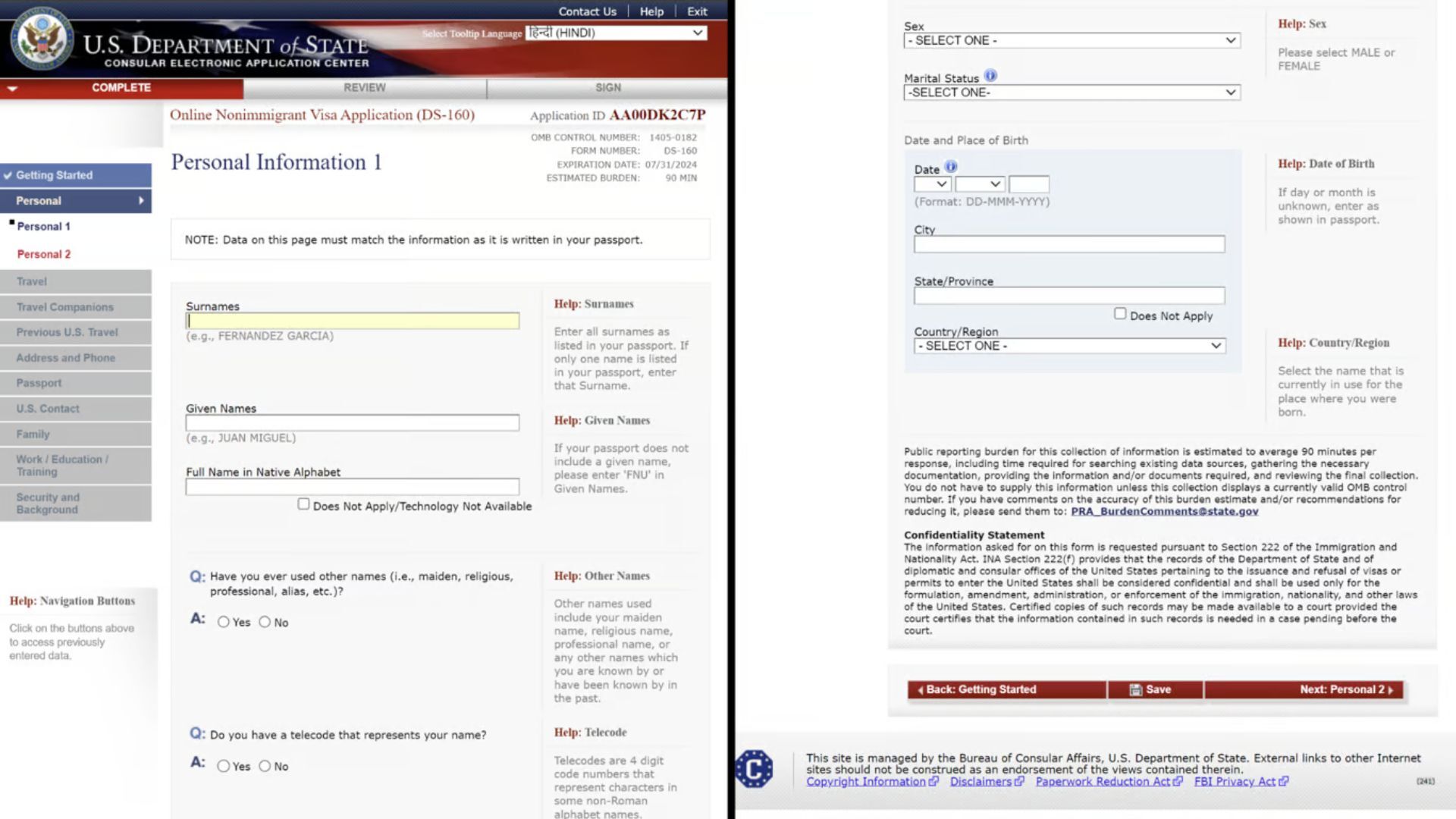
Other government portals share similar DNA. USCIS forms, state-level benefit applications, DMV portals - most were built in an era when "web application" meant server-rendered HTML and session state. They haven't been meaningfully rebuilt since.
The result: millions of people re-type the same personal information, over and over, into forms that offer no memory, no convenience, and no forgiveness when something goes wrong.
Why a Browser Extension Isn't the Right Answer
The obvious modern solution would be a browser extension - something like a password manager, but for government form data. And extensions do exist for general-purpose form filling.
But extensions come with meaningful tradeoffs.
They require installation from a browser store, which creates friction and platform dependency. They request broad permissions - often access to read and modify data on all websites you visit - which is a significant privacy consideration when the data in question includes passport numbers, travel history, and immigration status. They need to be maintained per-browser, kept compatible with browser updates, and reviewed by third-party gatekeepers.
For something as sensitive as immigration data, handing that to a persistent background extension feels like the wrong architecture.
A bookmarklet runs only when you click it. It has access only to the page you're currently on. It holds no persistent permissions. When it's done, it's done.
How Bookmarklets Handle the Postback Problem
The hard part of autofilling a portal like the DS-160 isn't finding the fields. It's timing.
Because the form uses server-side postbacks, many fields don't exist in the browser's DOM until a previous answer has been submitted and the server has responded. You can't simply dump all your answers into the page at once - the fields aren't there yet. You have to fill a field, wait for the server to respond and update the page, then fill the next one.
A well-built bookmarklet handles this with a MutationObserver - a native browser API that watches for changes to the page's structure in real time. When a new field appears in the DOM after a postback, the observer fires, and the bookmarklet fills it automatically.
The sequence looks roughly like this:
- User clicks the bookmarklet on the government portal
- Bookmarklet reads previously saved form data (from local storage or an imported file)
- It fills the first visible field and triggers the appropriate browser events to simulate real user input
- The page fires a postback to the government server
- The MutationObserver detects the DOM change when new fields appear
- The bookmarklet fills the next field, and the cycle continues
The result is a form that fills itself - handling all the postback sequencing automatically, without the user having to click through each question manually.
Privacy by Architecture
What makes bookmarklets particularly well-suited to government forms is the privacy model.
Your immigration data - dates of travel, employment history, family relationships, passport details - is among the most sensitive information you have. Any tool that handles it should touch it as little as possible, store it as little as possible, and transmit it to as few places as possible.
A bookmarklet that reads locally stored data and types it directly into an official government portal is, architecturally, about as minimal as it gets. There's no intermediary server. No third-party database. No account. The data flows from your device to the government portal, which is exactly where it was always going to go.
The Broader Opportunity
Government portals aren't going to be redesigned anytime soon. The DS-160 has looked the same for over a decade. USCIS forms get updated occasionally, but the underlying architecture doesn't change. The bureaucratic inertia behind these systems is real and well-documented.
That means the improvement has to happen at the edges - in tooling that meets the existing portal where it is, works within its constraints, and makes the experience dramatically better for the person on the other side of the screen.
Bookmarklets are one of the few tools technically capable of doing that: lightweight enough to be trusted, flexible enough to handle dynamic server-rendered pages, and private enough to be appropriate for sensitive applications.
The web gave us this tool decades ago. It's only now that the use case has become obvious.
See a real life example
Fillvisa generates a bookmarklet that helps autofill the DS-160 (U.S Nonimmigrant visa) website.
Check out Fillvisa's DS-160 form